Just click on "Add Company" and then find and click on the:
1) SERVER and folder where your package is situated
2) FOLDER that contains the company to be used to import the OFC, OFX or CSV Bank Statement files

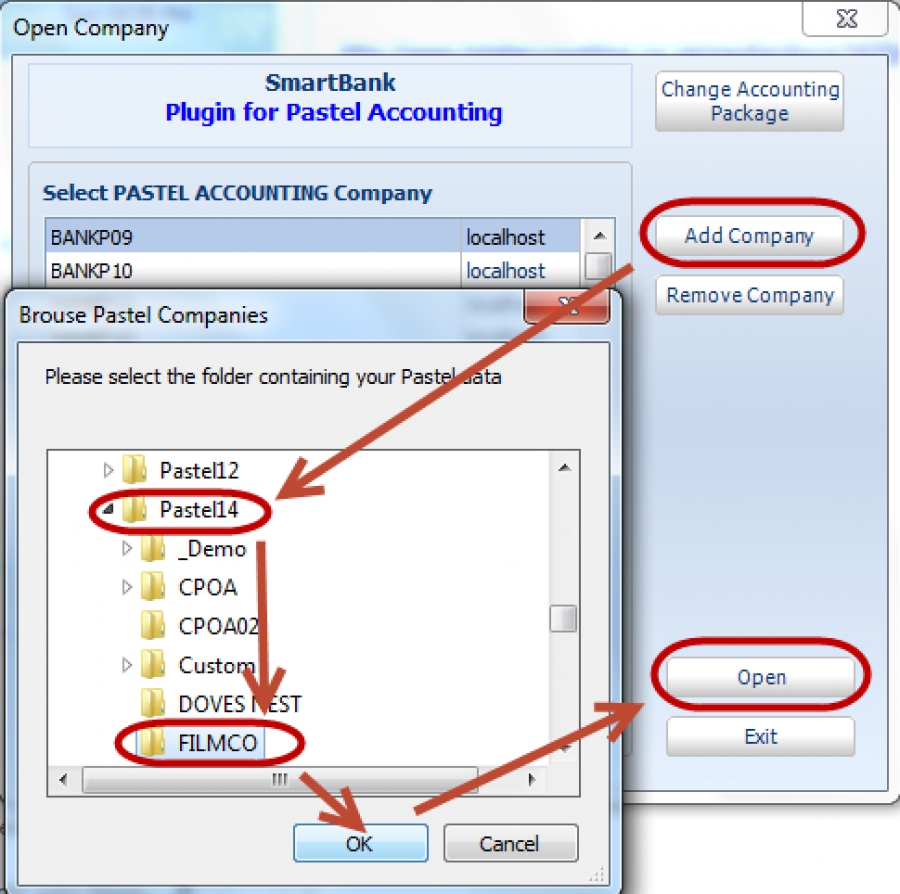
Just click on "Add Company" and then find and click on the:
1) SERVER and folder where your package is situated
2) FOLDER that contains the company to be used to import the OFC, OFX or CSV Bank Statement files
Call us on 082 06 12300 for a FREE SmartBank:
Download a SmartBank Free 30 day Trial – Please Click HERE
SmartBank Bank Manager
Tel: 082 06 12300
Sales: This email address is being protected from spambots. You need JavaScript enabled to view it.
Admin: This email address is being protected from spambots. You need JavaScript enabled to view it.
www.smartbank.co.za
Click here to contact us